Date Calculator: Everything You Need to Know (Complete Guide)
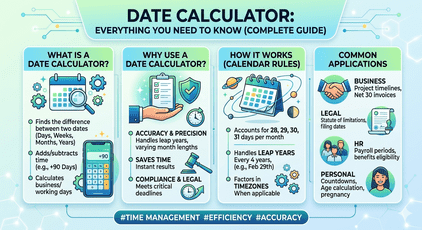
A comprehensive deep-dive into how date calculators work, how to use them, and why they are indispensable for personal, legal, financial, and business planning.
- What is a Date Calculator?
- How Does a Date Calculator Work?
- Types of Date Calculators
- Top Use Cases & Real-World Examples
- How to Use a Date Calculator (Step-by-Step)
- Frequently Asked Questions (FAQ)
- Pro Tips for Accurate Date Calculations
- Conclusion
A closer look at date calculators starts with their inner logic. Their function unfolds through step-by-step counting methods. Using one often feels like setting a clock forward or backward. Yet precision hides behind what seems basic. Different needs shape how people apply these tools every day. Life events, contracts, payments – they all rely on accurate spans between dates. Courts reference them just as often as budget planners do. Accuracy becomes silent support across many fields. The real power lies not in complexity but clarity.
One moment it helps track days until a celebration, then shifts to pinning exact dates for agreements. When age questions pop up, or schedules grow tangled, this tool steps in quietly. Not flashy, just useful. Found online, ready without fuss. Handles small puzzles and big plans alike. A helper that does not demand attention but earns trust through doing its job.
Picture this – years spent deep inside clocks, calendars, time zones. That knowledge shapes what comes next. Not theory. Real handling of real tools. Meet the date calculator. It does more than add days. Peek beneath its surface. See logic instead of magic. Watch it count intervals, skip weekends, adjust for leap years. Used at home. Just as useful at work. Accuracy matters wherever dates decide outcomes.
What Is a Date Calculator?
A date calculator handles math involving calendar days. Instead of crunching ordinary digits, it adjusts for quirks like February having 28 or 29 days. Leap years get factored in without extra steps. Month lengths shift naturally through its logic. Time zone differences are part of the process too. Accuracy comes from built-in awareness of how calendars actually work.
A date calculator tackles three key questions right from the start. What day falls on a specific calendar point? How far apart are two moments in time? Does a given year include an extra February day? Each query gets sorted without fuss. One follows after another. Clear. Direct. Done
Counting the days from one date to another? Find how long it spans across months and years. Duration shows up clearly once both points in time are set.
Count ahead or back any days, weeks, months, or years to land on a different date. When you need to know what day that lands on – just shift forward or backward in time using simple steps.
Monday, maybe? Pick a date. Figure out which day it lands on, past or ahead. Could be Tuesday. Or much later. Sometimes it’s just about counting forward, sometimes backward. Try one. Then another. Each gives a different answer. Dates shift under your eyes. Wait – was that Wednesday? It might take a second. But there it is.
A single click now handles what once took hours. Not just counting days, but skipping weekends automatically. Public holidays get folded in without extra steps. Age shows down to the exact day, not just years. Pregnancy timelines adjust on their own. Legal cutoffs appear instantly. Some tools even track fiscal shifts others miss.
How Does a Date Calculator Work?
A date calculator looks basic, yet its core runs on clever rules. What happens inside? Complex math handles every click. Step by step, hidden systems track months, leap years, even time shifts. Each result forms through precise steps, unseen but exact
The Julian Day Number Method
One way to handle dates is turning them into Julian Day Numbers. These numbers count every day nonstop from long ago – starting January 1, 4713 BC in the old-style calendar. Math gets easier because working with dates becomes like basic subtraction between whole digits. Instead of juggling months and years, just pull one number away from another.
A single day here, another there – computing time gaps gets easier when dates become numbers. Take January 1, 2024 through December 31 of the same year: each date shifts into its own Julian Day Number. Once transformed, the gap appears by removing the earlier from the later. Result? Three hundred sixty-five days pass, though the full year stretches to three hundred sixty-six – it leaps forward like clockwork.
Handling Leap Years
Every four years usually brings an extra day – unless we’re at a century mark that doesn’t divide cleanly by 400. The system skips February 29 on those exceptions, like in 1900, even though it divides by four. But 2000 kept the leap day because it passed the stricter test. These small rules pile up when counting dates across hundreds of years. Precision hides in these details, shaping accurate timelines far into past or future.
Month-Length Complexity
Some months last 28 days, others stretch to 31 – no pattern makes it obvious. Because of that mess, people mix up dates easily. A solid tool knows each month’s real length down to the day. Leap years? It accounts for those without hesitation. Ask what comes one month after January 31 – it won’t guess wrong. Instead of jumping to March, it lands quietly on February’s final day. No drama, just accuracy where most fail.
How Does a Date Calculator Work?
A date calculator looks basic, yet its core runs on clever rules. What happens inside? Complex math handles every click. Step by step, hidden systems track months, leap years, even time shifts. Each result forms through precise steps, unseen but exact
The Julian Day Number Method
One way to handle dates is turning them into Julian Day Numbers. These numbers count every day nonstop from long ago – starting January 1, 4713 BC in the old-style calendar. Math gets easier because working with dates becomes like basic subtraction between whole digits. Instead of juggling months and years, just pull one number away from another.
A single day here, another there – computing time gaps gets easier when dates become numbers. Take January 1, 2024 through December 31 of the same year: each date shifts into its own Julian Day Number. Once transformed, the gap appears by removing the earlier from the later. Result? Three hundred sixty-five days pass, though the full year stretches to three hundred sixty-six – it leaps forward like clockwork.
Handling Leap Years
Every four years usually brings an extra day – unless we’re at a century mark that doesn’t divide cleanly by 400. The system skips February 29 on those exceptions, like in 1900, even though it divides by four. But 2000 kept the leap day because it passed the stricter test. These small rules pile up when counting dates across hundreds of years. Precision hides in these details, shaping accurate timelines far into past or future.
Month-Length Complexity
Some months last 28 days, others stretch to 31 – no pattern makes it obvious. Because of that mess, people mix up dates easily. A solid tool knows each month’s real length down to the day. Leap years? It accounts for those without hesitation. Ask what comes one month after January 31 – it won’t guess wrong. Instead of jumping to March, it lands quietly on February’s final day. No drama, just accuracy where most fail.
Types of Date Calculators
| Type | What It Does | Best For |
|---|---|---|
| Date Difference | Calculates days, weeks, months, years between two dates | Project timelines, anniversaries, age |
| Date Addition | Adds or subtracts a time interval from a specific date | Deadlines, due dates, scheduling |
| Age Calculator | Computes exact age in years, months, and days | HR, legal age checks, birthday apps |
| Business Day | Counts only weekdays, excluding weekends/holidays | Legal, banking, payroll, contracts |
| Pregnancy Due Date | Estimates delivery date from last menstrual period | Healthcare, obstetrics, parenting |
| Countdown Timer | Shows time remaining until a future event | Events, exams, product launches |
Top Use Cases and Real-World Examples
A date calculator is useful across virtually every aspect of modern life. Here are the most important use cases:
How to Use a Date Calculator (Step-by-Step)
Figuring out dates gets easier after you know what goes in. Step by step, here’s how it works for the usual tasks – start at the beginning, move forward one piece at a time. First thing first: pick your starting date instead of guessing. Then decide where you’re headed – a future point or backward stretch. Input that number next, type it clearly without shortcuts. After that, hit calculate but only when everything looks right. Watch the result appear just below, clean and plain. Each part matters even if it seems small. Try another round if the answer feels off
Find how many days between two dates
Select Date Difference Mode
Some tools let you pick how dates are compared. Choose one that shows time spans between dates.
Put down when it begins
Start by entering the older date through the calendar tool, or just write it out. Use slashes or hyphens – whichever matches what’s asked. MM/DD/YYYY might show up first, though sometimes it flips to YYYY-MM-DD. Pick one way, stick to it. The system watches for consistency, so match the pattern shown. Typing works fine if clicking feels slow. Dates must line up exactly, no extra spaces or letters. Check twice before moving on.
Last day of the period comes here
Put in the more recent day. It might be right now, something before, or even ahead in time.
Choose how you want the result shown
Start by picking how you see time – maybe just days, or weeks, perhaps months alone. Try mixing them if that feels right: like 2 years with 3 months and 14 extra days tagged on. See it broken down your way, not forced into one box. The format bends to what makes sense for you. It could be simpler than expected, depending on where you land.
Click Calculate
A span of time pops up right away once you enter both dates – leap years slip in without notice, tucked neatly into the math. Month differences adjust themselves, quietly handled behind the scenes.
Adjusting Dates by Adding or Removing Days
Choose “Add/Subtract” mode
Start using the tool for adding dates instead. Or try adjusting dates by a set number of days.
Put in the starting date you want to use
This day marks where you begin – maybe now, perhaps another time entirely.
Put in the number you want to use for increasing or decreasing
Last on your timeline? Pick how many days, weeks, months, or years. Move back by entering a minus figure or ticking “subtract.” Time flows either way here.
Your result date appears on screen now
A date pops up, precise down to the weekday, so checking against workdays becomes quiet and simple. What shows is what counts – no guesswork when timing matters.
Frequently
Asked Questions
Enter both dates into a date difference calculator. It subtracts the earlier Julian Day Number from the later one to give you the exact count. For example, from January 1, 2025 to April 5, 2025 is exactly 94 days. You can also do this manually by subtracting day-of-year values, but a calculator handles month and leap-year complexities automatically.
Yes. Any reliable date calculator automatically accounts for leap years. The Gregorian calendar adds February 29 in years divisible by 4 (with the century exception). This means a year containing a leap day has 366 days, and the calculator adjusts all computations accordingly — especially important for multi-year spans.
A business day calculator counts only Monday through Friday, excluding weekends and optionally public holidays. This is critical for legal, banking, and contract deadlines. For example, "30 business days from today" is very different from "30 calendar days from today" — the former could be 6 calendar weeks away.
Absolutely. An age calculator takes a birthdate and computes the exact age in years, months, and days as of today (or any target date). This is useful for legal age verification, HR records, medical assessments, and eligibility checks where the exact age to the day matters.
Most modern date calculators support dates from at least January 1, 1900 through December 31, 2100 — covering the full practical range for human use. Advanced calculators may extend to dates thousands of years in the past or future using the proleptic Gregorian calendar.
The most common mistake is confusing whether the end date is inclusive or exclusive. For example, "from January 1 to January 31" is 30 days (exclusive end) or 31 days (inclusive). Always clarify whether both the start and end dates should be counted, especially in legal and billing contexts.
Pro Tips for Accurate Date Calculations
Last thing I learned after ten years handling dates in law, money work, and code? Pay attention to how each system counts days. One mistake early on can ripple through months. Not every calendar treats February the same way. Leap seconds break more things than people expect. Always check what time zone your data assumes by default. Mistakes hide in edge cases nobody talks about. Even small rounding errors add up when repeated thousands of times. Some formats look right but sort wrong. Midnight isn’t always 00:00 everywhere. Different countries start weeks on different days
1. Always clarify inclusive vs. exclusive dates
Agreement dates often kick off the clock, making that day zero when counting thirty days toward a cutoff. Yet court practices differ by region, so what counts there might not count here. Always check the fine print where you are before trusting any due date math.
2. Use ISO 8601 format when sharing dates internationally
A date like 2025-04-05 makes things clear because it sidesteps confusion from U.S. versus European styles. One small change avoids expensive mix-ups when people work across borders or sign agreements.
3. Account for time zones in deadline calculations
Midnight in one place hits five hours earlier somewhere else. Picture paperwork needing to land by close of business where it matters – that clock depends on location. When courts mark deadlines for end of day, what counts is their local time, not yours. So if New York says done by today, London still has hours left even when it seems past due. Time zones shift the moment something’s late.
4. Manually verify end of February numbers
Midnight quirks pop up around February’s last days, worst when leap years toss in an extra date. If being right counts – say a loan wraps up on the 28th or maybe the 29th – run it past another checker before trusting.
5. Use business-day calculators for anything financial or legal
Might seem odd, yet counting every calendar date works okay for daily plans. When money matters though – contracts, court dates, payments – it pays to switch gears. Weekends slow things down. So do government holidays, depending on the region. Best to rely on tools built only for working days instead.
Here is something developers often overlook. Storing timestamps in UTC avoids confusion across regions. Instead of using local times, keep everything standard until it shows up on screen. That midnight moment on New Year’s Day won’t slip backward by accident. Without this method, records might appear shifted when seen elsewhere. Errors in banking or contracts have happened due to such slips. The fix lies in delaying conversion until presentation. Time zone adjustments belong at the very end, not earlier.
Conclusion
One day slips into another, yet knowing exactly when matters. Picture a baby born today – eighteen years later lands on a Tuesday. A loan signed now ends decades from here, down to the calendar square. Laws demand timing too; miss by one morning, doors shut. This kind of math isn’t guesswork – it fits moments like puzzle pieces. Time ticks, plans form, dates lock in place.
A few things stick out after reading through. Figuring out which kind of date math applies comes first. When deadlines loom, it helps to confirm if they mean regular days or just workdays. Dates written the ISO way rarely cause confusion later. If the result really matters, run it by another method just to be sure.
Start counting right, no matter if it’s a web tool, a cell formula, or code from a library. What matters stays unchanged – getting dates correct cuts delays, avoids expensive mistakes, keeps things moving smoothly.

Shivam AI Tools provides simple, fast, and reliable online calculators to help users plan better and make informed decisions. Our tools are designed for ease of use and educational purposes only
Our Services Tools
Our Services Tools
Contact Us
Best Development Company Shivam Software Raipur Chhattisgarh
+91 9669251442
shivampandey22798@gmail.com